

Forum Replies Created
-
AuthorPosts
-
marcnyc
ParticipantThank you so much!
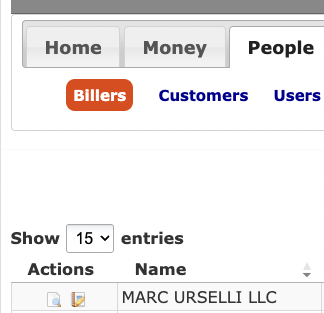
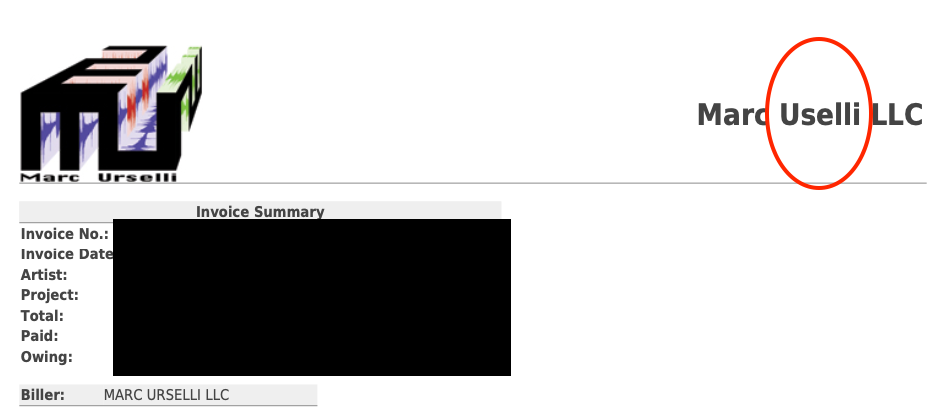
I’ve looked for this preference everywhere! 😉ParticipantAttached are screenshots.
It’s not the Biller on the left of the invoice but in the upper right corner…ParticipantYes I am referring to the Biller name.
Inside the SI menu PEOPLE > BILLERS it is spelled correctly, however in my PDF invoices the biller name in the top right corner is misspelled and I can’t find where to correct this…
I checked inside the SI Defaults and it is spelled correctly in there as well. Inside the SI Defualts the “Default Invoice Template” is set to “default”.ParticipantJust checking in to see whether you had a chance to test this on your end…
wondering if this is a bug in the code or I’m making a mistakeParticipantThanks for continuing to provide ideas.
This method is a bit too complex for my knowledge of PHP, however I was able to find a solution… I don’t know if you read my #2251 reply, but your previous suggestion DOES work, except the inclusion of the Inc/Clazz file DOES NOT work, so there might be a bug in the code whereas it doesn’t look for an Inc/Clazz file in the Extensions dir… you know what I mean?ParticipantI did a bit more digging…
…your solution works but copying the Inc/Claz/Invoice.php to the extensions directory does NOT work… maybe it’s a bug in the code but the php file is not included…
I know this because if I made the changes on root/Inc/Claz/Invoice.php file then your soltuion works but if I leave that file un-edited and I put my modified version in root/extensions/MYextension/Inc/Claz/Invoice.php it does not work…
I’ve also tried putting it in:
root/extensions/MYextension/templates/Inc/Claz/Invoice.php
and in:
root/extensions/MYextension/modules/Inc/Claz/Invoice.phpNone of the locations call the new file in Inc/Claz
ParticipantThank you for responding and for your suggestion.
I’ve tried doing what you suggest and I’ve added the line:
‘custom_field1’ => $row[‘custom_field1’],`
around line 215 in the Inc/Claz/Invoice.php file that I’ve copied into my extensions folder, like so:
            $tableRows[] = [
                'action' => $action,
                'index_id' => $row['index_id'],
                'custom_field1' => $row['custom_field1'],
                'customer' => $row['customer'],
                'preference' => $row['preference'],
                'date' => $row['date'],
                'total' => $row['total'],
                'owing' => isset($row['status']) ? $row['owing'] : '',
                'aging' => $row['aging'] ?? '',
                'currency_code' => $row['currency_code'],
                'locale' => preg_replace($pattern,'$1-$2', $row['locale'])
            ];
…but I am still getting the same error…
do I need to add a custom_field1 line anywhere else in this file?ParticipantI see in the si_invoices table in phpMyAdmin that they are called custom_field1, custom_field2 etc but if I edit my manage.tpl file code from this:
                "columns": [
                    {"data": "action"},
                    {"data": "index_id"},
                    {"data": "biller"},
to this:
                "columns": [
                    {"data": "action"},
                    {"data": "index_id"},
                    {"data": "custom_field1"},
What I get when I reloead the web page is this error alert box:
DataTables warning: table id=si-data-table – Requested unknown parameter ‘custom_field1’ for row 0, column 2. For more information about this error, please see http://datatables.net/tn/4
I don’t see the
billerbeing one of the si_invoices table columns so I have a feeling I’m changing the wrong part of the code, but that is the only place I see the word “biller” appear in the manage.tpl file and I don’t see it appear anywhere else in that file or in the manage.php file.What am I missing?
ParticipantOh damn, I feel stupid now… it’s always the small stuff…
Ok so now that I see what I’m modifying, would you please tell me what the names of the Custom Fields are in the database?
Speicfically, if I have:
invoice :: Custom field 1 set to ArtistHow can I access/refer to/call the name of the invoice :: Custom field 1 and the contents to put inside the json file?
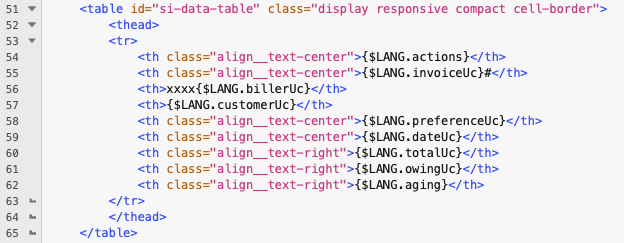
ParticipantYes I had figured out the switch thing on my own by clicking around, but I don’t see those XXXX appear anywhere…
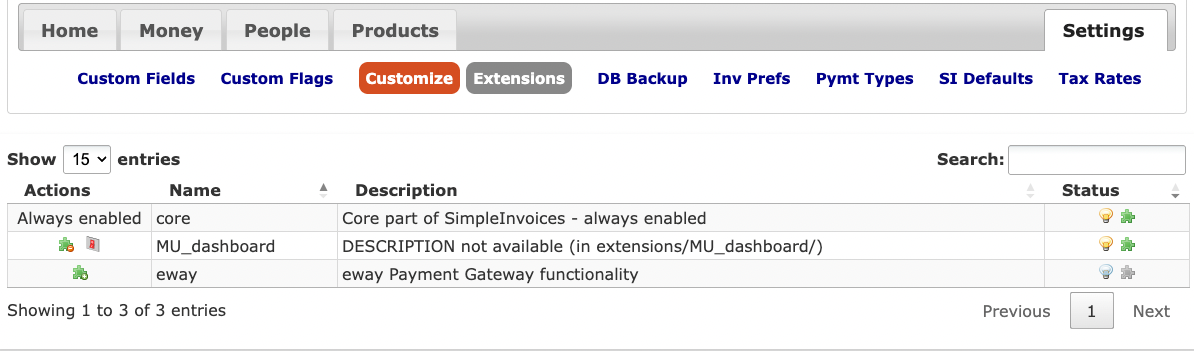
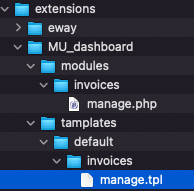
here’s screenshots of my structure and backendOctober 20, 2025 at 11:00 am in reply to: How to make the Search field search in other fields? #2236ParticipantI think this is the post you were referring to in the other thread…
I followed these instructions and I copied /modules/invoices/manage.php to extensions/MYextension/modules/invoices/manage.php and then I copied /templates/default/invoices/manage.tpl to extensions/MYextension/templates/default/invoices/manage.tpl and then I enabled MYextension in SETTINGS > Customize > Extensions (it now has a lit light bulb and a green puzzle piece on the right).You mentioned the getAllWithHavings but in the manage.php file I only see this code:
    $invoices = Invoice::getAllWithHavings($having, '', '', true, false,
                                           $invoiceDisplayDays);
and no other way to add any fields there…
Next I opened in the editor the manage.tpl file and where the table is built and this line is:
<th>{$LANG.billerUc}</th>
I’ve added (just to make sure I’m in the right place) of the code:
<th>xxxx{$LANG.billerUc}</th>
but I don’t see those “xxxx” being displayed anywhere in my table, even after re-loading, logging out and using an incognito browser window. What am I doing wrong?Also later in that file I see:
    <script>
        {literal}
        $(document).ready(function () {
            $('#si-data-table').DataTable({
                "ajax": "./public/data.json",
                "orderClasses": false,
                "deferRender": true,
                "responsive": true,
                "columns": [
                    {"data": "action"},
                    {"data": "index_id"},
                    {"data": "biller"},
                    {"data": "customer"},
                    {"data": "preference"},
                    {"data": "date"},
but what are the other “data” fields I can add here? How do I add the custom fields here?
October 20, 2025 at 10:20 am in reply to: How to make the Search field search in other fields? #2233ParticipantSorry but I cannot find another post of mine where this is addressed… Could you please link to the relevant response or tell me in this thread how I can add fields to the Table so that I can display other fields from the database, thus have them searched by the search function?
Much appreciated.
Participantbumping this cause I need to search in some of the other fields…
September 24, 2025 at 12:21 pm in reply to: How to make the Search field search in other fields? #2228ParticipantGot it. That’s part of why I want to add some fields in that table. I’ve asked this in my other post, so I won’t double-post here and I hope you can show me in the other post how to add some fields to the table. Thank you
-
AuthorPosts
Recent Comments