SimpleInvoices Group Forum › Forums › Fearless359 SimpleInvoices Discussion Group › Startin invoice number
Tagged: invoicenumber
- This topic has 8 replies, 3 voices, and was last updated 1 week, 6 days ago by
edsulst.
-
AuthorPosts
-
March 2, 2026 at 8:59 am #2301
edsulst
ParticipantI would like to change the start of the invoice number.
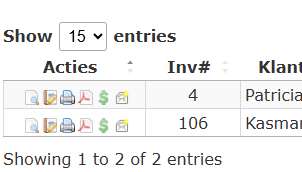
To do that, I have to change the starting number, but whatever number I set, it always change to a different invoice.But when I take a look in the invoices tab, the first invoice is number 106, so I expect the next invoice to be 107, but it gives me number 4.
What do I do wrong?
Gr. Edwin.
Attachments:
March 2, 2026 at 1:17 pm #2304fearless359
KeymasterFirst, have you read the How To topic on Change The Invoice Number Starting Point? It’s a bit complicated but then again so is the logic SI uses to determine the value. In the simplest case, there is only one index record and all preferences get their numbers from that record.
For me to try and determine what is happening on your system, I would need you to export the si_index, si_invoices and si_preferences tables. Zip them and attach the zip file to a response to this message. There is no revealing data in these tables as identities exist as numbers to the ids of records in other tables. You can review this to verify it to your satisfaction before giving me the data.
March 3, 2026 at 4:49 am #2305ParticipantIt’s really complicated, and maybe I did something wrong. (I’m sure I did, but don’t know what)
If you can help me out that would be great.
-
This reply was modified 2 weeks, 2 days ago by
Attachments:
March 3, 2026 at 3:18 pm #2308KeymasterI see there is a problem. I will work on fixing it. In the meantime, I need to know if there are only the two invoices in the database? If yes, can you start with a new installation? To do this, simply empty all tables in the database. An admin tool such as phpMyAdmin simplifies this. You will need to disable the Check Foreign Keys option when you do this. This is a setting on the Yes/No empty table confirmation line when using the phpMyAdmin tool. Hopefully something similar if you are using another maintenance tool.
With the database empty, access SI. Do the initial installation and then start using SI. Add your biller, customer and product records. Now go to the Inv Prefs option in the Settings tab. Edit the Invoice record and set the Starting Number to the value you want assigned to your first invoice. I assume this is 106. Save this change and then you should be able to add your invoices with the correct invoice numbers being set as new ones are added.
Let me know if it isn’t an install with two invoices in it, such that you can’t really start over. Also, what is the next invoice number you want to be assigned? I’ll let you know what you can do in this case.
-
This reply was modified 2 weeks, 1 day ago by
fearless359.
March 4, 2026 at 9:06 am #2310ParticipantThank you.
I have indeed 2 invoices. I had a pre 2019 version and i’ve tried to update, but it failed.
So now I have start over with a new database and therefore my invoicingnumber has to start with 106.After empting the tables and set everything up it’s working fine now.
March 4, 2026 at 3:57 pm #2311RRowley
ParticipantConcerning your pre 2019 version. Did you run your issues through this forum? Not sure if I previously tried to help you and failed or not. Regardless, if you want to try converting it again, I’d like to try and help. It might take a few tries, but I’ve had good success helping people. This would help you have all that historical information you’ve built up. Let me know.
March 5, 2026 at 12:25 am #2312ParticipantIt would be nice to convert my previous version so I hava all my history, but when I give it a try it failed and I had to restore my db backup. I don’t know what error I got on my screen.
Therefore I installed the 2026 version and a blank database.
Is it possible to import all tables from my existing 2019 database into the new database?
Or can I upload my “old” database so you can convert it so that it is working with the 2026 version?March 5, 2026 at 11:19 am #2314ParticipantPlace the SQL export dump of the data base (both structure and data) in a password protected zip file. Email that zip file to admin@simpleinvoices.group. In a separate email, send me the password. I’ll confirm receipt, do the conversion and then send it back to you via the email address you sent it from. I’ll protect it with the same password you used. Respond to this forum message once you have sent it, so I’ll know to be on the lookout for it. Set the email title to something like, SI Conversion Issue, so it will stand out from all the messages I get.
March 5, 2026 at 12:01 pm #2315ParticipantGreat.
I’ve just send you the file and password in sepearate messages.Thanks for your help !!
-
AuthorPosts

- You must be logged in to reply to this topic.
Recent Comments